



UI/UX Design Services That Turn Complex Digital Products Into Experiences People Choose to Use
Design Every Screen Around What Your Users Actually Need Not What Your Tech Stack Allows
When your team builds a new product, the biggest risk is not a technical failure. It is shipping something users do not understand. Buttons placed where engineers expect them, not where users look. Navigation that makes sense to the people who built it but confuses everyone else. A checkout flow that loses a third of your buyers at step two because no one tested it before launch.
That is exactly where professional UI/UX design services make the difference between a product people adopt and one that quietly generates a helpdesk queue.
At Digital Dividend, we have been designing digital products around how users actually think since 2008. Our design and software development teams have delivered 300+ products across Europe, North America, and the GCC for startups shipping their first build and enterprises modernising platforms their teams depend on daily.
Why Digital Products Fail and What Professional UI/UX Design Prevents
Shipping Features Users Abandon Because Nobody Has Tested the Flow
You build the feature. You release it. Users ignore it, report it as broken, or find a workaround. Nine times out of ten, the problem is not the code. It is that no one validated the flow with a real user before development started.
Inconsistent interfaces that erode brand trust across every screen
Every screen that looks or behaves slightly differently from the last makes your user question whether they are still in the same product. Inconsistency signals instability. Instability loses customers quietly, over time, in ways your analytics take months to surface.
Design and engineering working in silos with no shared system
When designers hand over a Figma file and engineers interpret it differently on every component, you rebuild the same thing twice. A shared design system prevents this but only when it is built into the process from the start, not patched in after the first release.
UX decisions made by developers — and technical decisions made by designers
Both are avoidable if the right people are involved at the right stage. Developers who define user flows produce products that are technically correct but practically unusable. Designers who specify functionality without understanding constraints produce specs that cannot be built on time or within budget.
Usability testing is left until post-launch, when changes cost ten times more
A usability issue caught in a wireframe takes an afternoon to fix. The same issue was caught after development took a full sprint. Caught after launch, it takes a re-architecture and an explanation to your users about why something changed.
How Digital Dividend approaches every UI/UX design engagement
We do not start in Figma. We start with your users.

Discovery, stakeholder workshops, and goal alignment
We begin by understanding your business goals, your users’ goals, and where the two intersect. Every design decision from this point traces directly back to what was established in discovery. Without this foundation, even a technically polished design solves the wrong problem.

User research, behavioural analysis, and jobs-to-be-done mapping
We conduct structured user interviews, analyse existing analytics where available, and map what your users are genuinely trying to accomplish. Not what your team assumes they want. What the data and direct user contact confirm is that they need.

Information architecture and user flow design
Before any screen is drawn, we map the full journey. Every entry point, every decision branch, every exit. This stage prevents the most expensive mistakes in digital product development the ones that only become visible after something is already built.

Wireframing and low-fidelity prototyping
We build skeletal screen layouts and validate the structure before visual design begins. At this stage, we are testing logic, hierarchy, and flow — not aesthetics. Changes here take hours, not sprints.

Visual design and component library creation
Once the structure is confirmed, we build the visual layer. Colour, typography, spacing, iconography all codified into a reusable component library your engineering team can reference throughout development and beyond.

Usability testing and design iteration
We test with real users before developer handoff. Every session produces a findings report. Every prioritised finding is resolved before the design reaches development. This is not an optional step in our process.

Developer handoff, annotation, and QA design support
We deliver annotated, production-ready Figma files and remain available through QA to confirm that what the team builds matches what was designed. Handoff is a process, not a moment.
Our UI/UX design services — built around your users, delivered for your business
UI UX research and testing services
We conduct qualitative user interviews, moderated and unmoderated usability testing, heuristic evaluations, and behavioural analysis. Every research engagement produces validated personas, journey maps, and a prioritised findings report that drives every subsequent design decision.
UI UX prototyping services
From low-fidelity wireframes that test structure to high-fidelity interactive prototypes that simulate the finished product, we build testable representations of your experience before a line of code is written. All prototypes are delivered in Figma with full interaction logic and ready for user testing.
Web design solutions
We design web products and digital experiences for businesses that need more than a template can offer. Our web design solutions cover landing pages, marketing sites, internal tools, and full platform interfaces each designed around the specific goals of the people using them.
UI UX design services for mobile apps
We design native and cross-platform mobile experiences for iOS and Android. Because our design teams work directly alongside our mobile app development engineers, the design system is built with real implementation constraints in mind from day one not handed over as a file for developers to interpret.
UI UX design services for e-commerce
We design e-commerce experiences that reduce cart abandonment and increase average order value. From product page layout to checkout flow optimisation, every decision is tested against user behaviour data before it is considered final. An e-commerce interface that reduces one dropout step typically returns its design investment in the first month of operation.
Responsive UI UX design services
Every interface we design is built for every screen size. Responsive design is not an afterthought or a mobile-adaptation pass at the end of the project. It is specified at the wireframing stage, tested on real devices, and validated before handoff.
UI UX design services for SaaS products
SaaS products are judged on their user experience more than almost any other category. We design SaaS interfaces that reduce churn, improve feature adoption, and make complex functionality feel straightforward to non-technical users. Our AI software development and SaaS design work follows the same research-led process regardless of the underlying technical complexity.
Design system and component library creation
We build design systems your engineering team can build from without requiring constant designer input. Every component is named consistently, documented clearly, and structured in a way that maps to your development environment whether you are using React, Flutter, or a custom framework.
UX audit and heuristic evaluation
Already have a product in the market? We review it against established usability heuristics and real user behaviour, then deliver a prioritised improvement list with projected impact ratings. An audit is often the most cost-effective starting point for businesses with an existing product that is not converting or retaining at the rate it should.
AI experience design
As AI-powered features become central to product strategy, the UX of those features requires a different design approach. Conversational interfaces, adaptive dashboards, and AI-assisted workflows each have distinct interaction patterns. We design AI experiences that feel intuitive to real users, not experimental to early adopters.
“Working with Digital Dividend felt like having a design team embedded in our own business. They understood our users before they touched Figma.”
Client, SaaS platform, Sweden
Industries we design digital products for
SaaS and enterprise software
Complex functionality needs simple interfaces. We design SaaS products that make powerful features accessible to non-technical users without removing the depth that power users require. Feature adoption rates improve when users can find what they need without onboarding support.
E-commerce and retail
Every step of friction between product discovery and purchase costs revenue. We design e-commerce interfaces around the paths real buyers take confirmed through session data, heatmaps, and usability testing not the paths retailers assume they take.
Healthcare and MedTech
Clinical interfaces need to be fast, clear, and error-resistant. We design healthcare products that clinicians trust and patients understand, with accessibility compliance and privacy-safe UX patterns built in from the first wireframe.
Fintech and financial services
Trust is the product in financial services. We design fintech interfaces where every visual decision from dashboard information hierarchy to notification design communicates reliability and reduces cognitive load at moments that matter.
EdTech and learning platforms
We have designed learning platforms, including Laroteket, a Swedish school platform built for teachers creating content and students consuming it. Both user groups had different levels of digital confidence. The interface required no training material for either.
Logistics and supply chain
Complex operational data needs to be actionable at a glance. We design logistics interfaces that surface the right information for the right role at the right moment reducing the time operators spend interpreting data and increasing the time they spend acting on it.
Designing for accessibility, privacy, and regulatory compliance from day one
WCAG 2.1 AA and accessibility-first design
We design to WCAG 2.1 AA standards as a baseline, not a checklist item at the end of a project. Colour contrast ratios, keyboard navigation, and screen reader compatibility are all specified at the design stage because retrofitting accessibility after development is significantly more expensive than building it in.
GDPR-compliant UX patterns for data consent and privacy flows
We design consent flows, cookie management interfaces, and data access screens that satisfy GDPR requirements without degrading the user experience. Regulatory compliance and good UX are not mutually exclusive but they require deliberate design, not legal text pasted into a modal.
HIPAA-aware interface design for healthcare and telehealth products
Our healthcare design work references HIPAA guidelines throughout the design process. Our telemedicine app development work provides examples of how we handle sensitive health data in consumer-facing interfaces while maintaining usability for clinicians under time pressure.
Section 508 compliance for government-adjacent digital products
Products serving government clients or publicly funded organisations require Section 508 compliance. We design with these standards in scope from the initial discovery phase, so compliance is built into the product rather than audited in after the fact.
The design tools and technologies behind our UI/UX practice
-
Figma and FigJam
Our primary design and collaboration environment. All deliverables are built in Figma and shared with client teams in real time. Client stakeholders can comment, review, and track changes throughout the design process without needing any design software themselves.
-
Adobe XD, Photoshop, and Illustrator
Used for visual asset creation, complex illustration, and projects where additional creative production work is required alongside the core UX deliverables.
-
Maze, Lookback, and Hotjar for usability testing and behavioural research
We use moderated and unmoderated testing tools to validate designs with real users before handoff. Post-launch, Hotjar session recordings and heatmaps feed back into the design iteration cycle.
-
Zeroheight and Storybook for design system documentation
Design system components are documented in Zeroheight for design team reference and connected to Storybook, where development teams require code-aligned component documentation.
-
Miro for collaborative workshops, journey mapping, and service blueprinting
Discovery workshops and service design sessions run in Miro, giving all client stakeholders a shared workspace regardless of their location or time zone.
-
Lottie and After Effects for motion design and micro-interactions
Motion design assets are built in After Effects and exported via Lottie for production-ready implementation keeping animation quality consistent between design specification and built product.
-
Jira and Confluence for sprint-based design delivery
Design sprints run in Jira alongside development sprints. Every design decision is documented in Confluence, so context is available to anyone who joins the project at any stage.
How much do UI UX design services cost? Honest estimates for 2026
The cost range for professional UI/UX design services is wide and for good reason. A focused landing page redesign and a full enterprise product design system are completely different engagements in scope, team size, and time.
What drives the cost of a UI/UX design engagement
Screen count and interaction complexity
Research depth and number of usability testing rounds
Whether a full design system is in scope
Typical timelines by project type: from landing page to enterprise platform
Affordable UI UX design services: what each budget tier actually delivers
Engagement models: fixed-scope project, sprint retainer, or embedded design team
Core UI/UX deliverables you receive on every engagement
- User research report and validated persona documentation
- Journey maps and end-to-end user flow diagrams
- Low-fidelity wireframes for all key screens
- High-fidelity interactive prototype
- Design system and reusable component library
- Usability test results and design decision log
- Developer-ready Figma files with annotations and redlines
- Post-handoff QA design review
The business case for investing in professional UI/UX design services
Higher conversion rates through friction-free user journeys
Every unnecessary step in a user journey is a potential dropout point. Research from Forrester consistently shows that improving UX can raise conversion rates by up to 400 percent in e-commerce and SaaS contexts. The investment in removing friction repays itself directly in measurable revenue outcomes.
Fewer development cycles — design decisions made before a line of code is written
Fixing a UX problem in a wireframe costs a fraction of fixing it in code. The IBM Systems Sciences Institute found that fixing a defect found during design costs 10 times less than one found during development and 100 times less than one found post-launch. A professional UI/UX design process front-loads the decision-making so your engineering team builds the right thing the first time.
Stronger user retention through consistent, intuitive interfaces
Interfaces that behave consistently build user confidence. Confident users stay longer, explore more features, and refer others. Users who encounter confusion at a critical moment during onboarding, at checkout, at a key interaction churn quietly and do not typically come back.
Faster product launches with reusable design systems your team builds from
A well-built design system reduces the design overhead on every feature after the initial build. Teams ship new screens faster, maintain visual consistency without additional design review cycles, and spend less time resolving component decisions that should have been made once and documented.
Reduced support volume as users find what they need without help
Every support ticket asking how to complete a task that should be intuitive is a UX problem with a measurable cost. Reducing that ticket volume is a direct operational saving that compounds with every user who never needs to ask.
What end-to-end UI/UX design delivery looks like with Digital Dividend
We build scalable, user-friendly restaurant software for food businesses, restaurants, cloud kitchens, and multi-location chains. From ordering and loyalty apps to reservation systems and operations platforms, our solutions help restaurants improve efficiency, boost retention, and streamline daily operations.
Discovery and user research (Weeks 1 to 2)
Stakeholder interviews, existing product review where applicable, user research planning, and initial journey mapping. Outputs include a research plan, a stakeholder alignment document, and a confirmed project brief.
UX architecture, information design, and wireframing (Weeks 2 to 4)
User flow documentation, information architecture mapping, and low-fidelity wireframes for all key screens. First structured client review at the end of the phase. Changes at this stage cost hours, not sprints.
Visual design and design system build (Weeks 4 to 7)
Visual design applied to wireframe-approved screens. Component library built in parallel. Brand alignment is confirmed with client stakeholders before full visual application begins.
Prototype, usability testing, and design iteration (Weeks 6 to 9)
Interactive prototype built in Figma. Usability testing sessions conducted with users representative of your target audience. Findings documented, prioritised, and resolved in design before handoff.
Developer handoff and QA design review (Week 9 onwards)
Annotated Figma files delivered to the development team. QA review session conducted against the built product. Discrepancies between design specification and built output were flagged and resolved before release.
Design retainer and product evolution support
Post-launch, most of our clients retain our design team on a sprint basis to extend the product, run additional research cycles as the user base grows, and maintain the design system as new features are added. A design system without ongoing maintenance drifts out of alignment with the product within two to three release cycles.
Start with a free UI/UX design consultation — no commitment required
What happens in your 30-minute design discovery call
What we send after the call
UI/UX design in action: products we have helped build
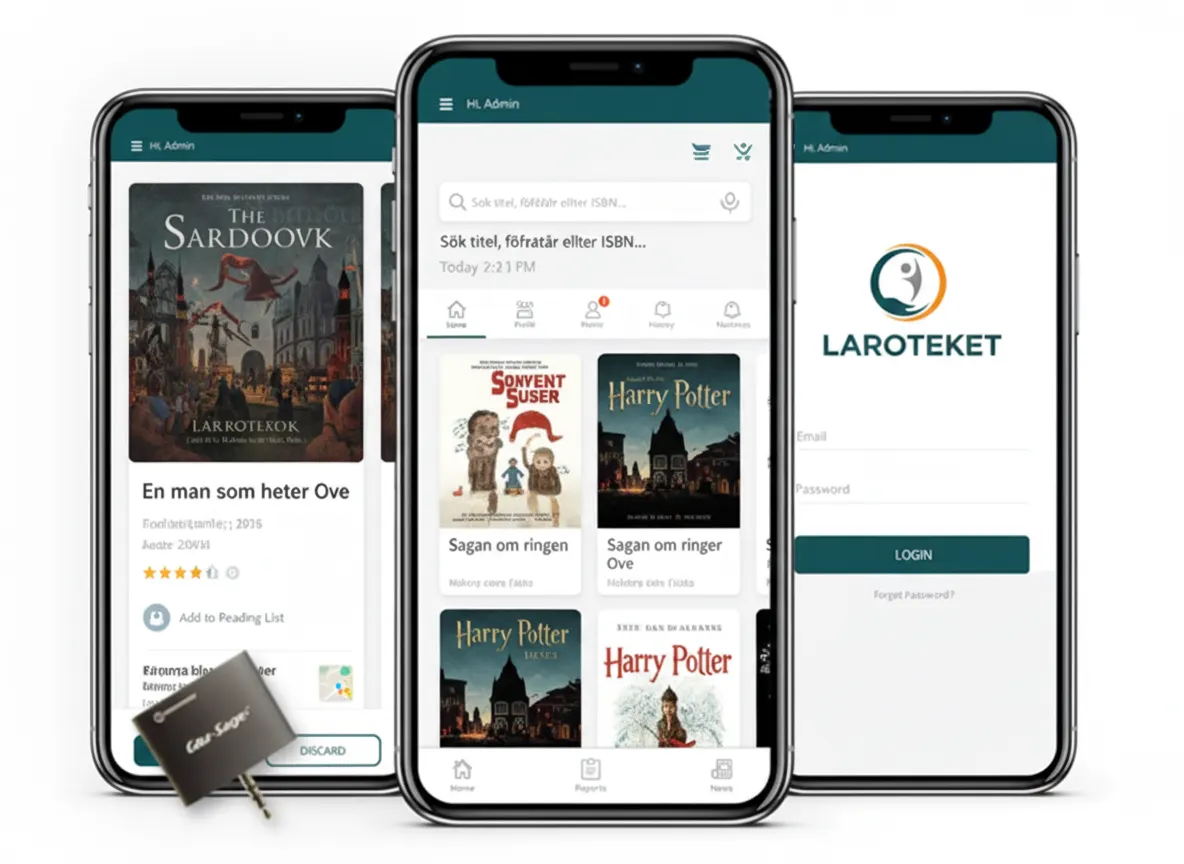
Laroteket — designing a scalable learning platform for Swedish schools
Laroteket needed a platform that served two very different user groups. Teachers creating and organising curriculum content. Students are consuming that content across different subjects and year groups. Both groups had different levels of digital confidence and different mental models for how a learning tool should work.
We conducted structured user research with representatives of both groups before designing a single screen. The information architecture was built around how teachers actually organise knowledge, not how a database logically stores it. The result was an interface that required no onboarding material for either audience.
RUYAH — designing resource management interfaces for 1,000+ users in the oil sector
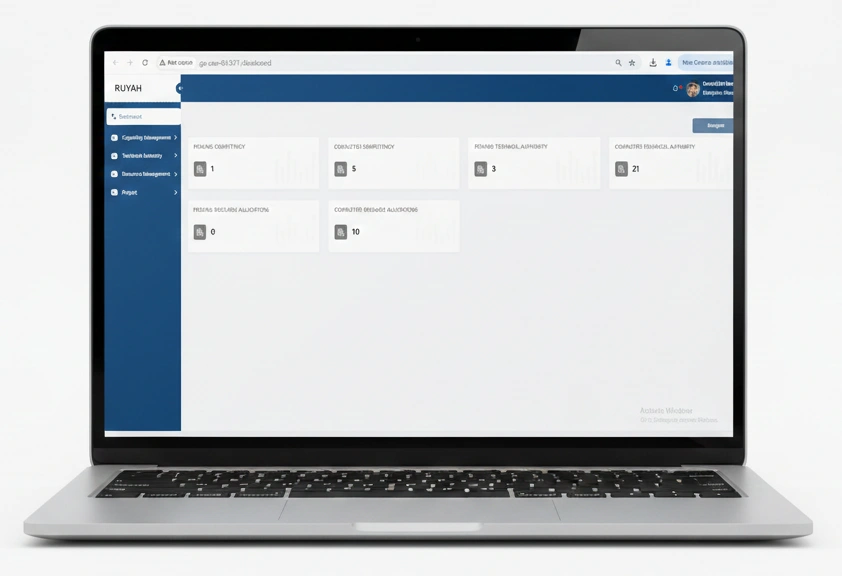
RUYAH required a resource management system for a Middle Eastern oil sector client coordinating over 1,000 users across multiple departments and locations. The design challenge was surfacing the right data for each role without overwhelming a single interface with information relevant only to other roles.
We designed a role-based dashboard system that reduced the time required to complete core resource allocation tasks. Department managers saw only their allocation data. Administrators saw cross-departmental views. Neither group saw data that would distract from their primary workflow.
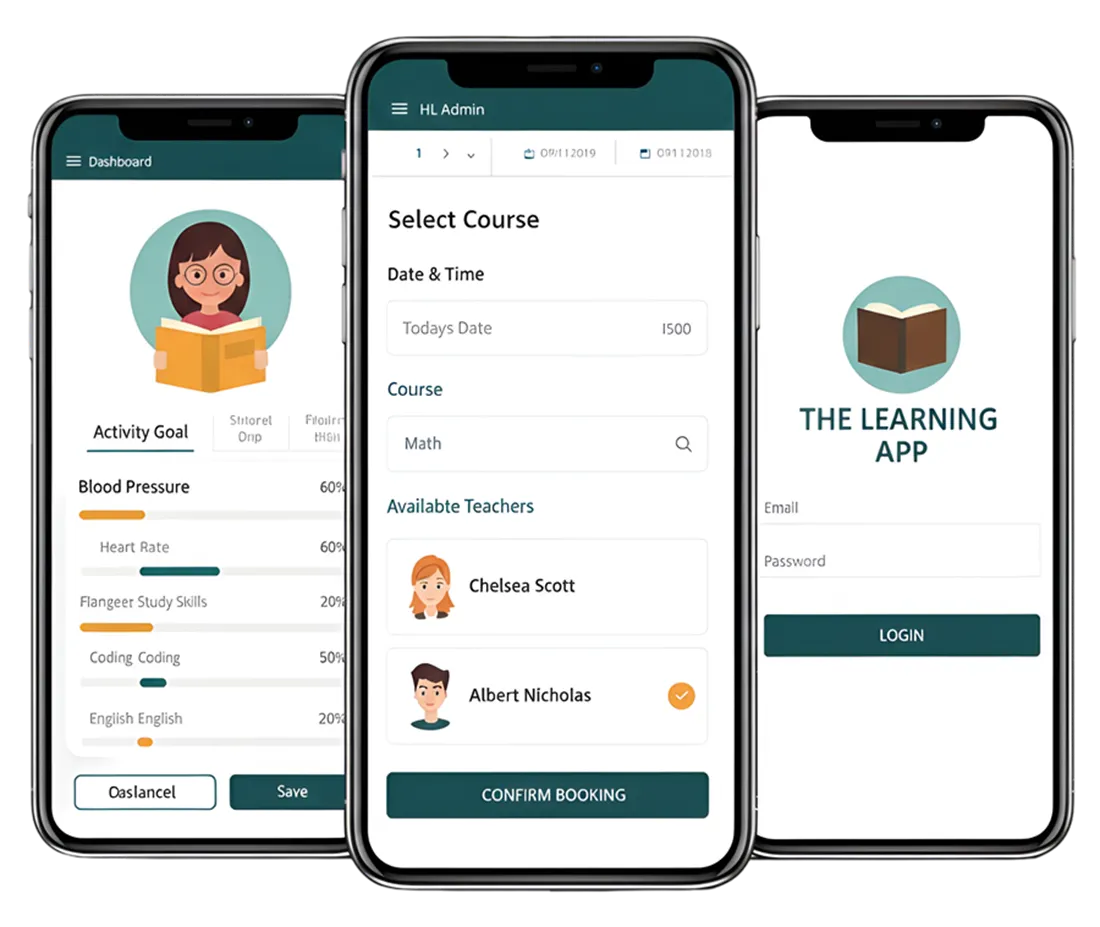
The Learning App — UX design for a modular EdTech platform
A modular learning platform requiring a consistent interface across a growing and evolving feature set. We built a design system at the outset that allowed the product to add new modules without requiring design rework on existing screens. The system has supported multiple feature releases without visual inconsistency.
Digital Dividend UI/UX design — by the numbers
Restaurants work in an environment where margins, customer expectations, and operational consistency all matter at once. Our work is designed to support outcomes such as:
300+
digital products designed and delivered since 2008
100+
designers and developers working in-house no subcontracting, no handoffs to third parties
15+
years designing for startups, enterprises, and organisations at every stage in between
Clients in Sweden, the USA, the GCC, and across Asia served by one globally coordinated team
Who provides top-rated UI UX design services? Why businesses choose Digital Dividend
Designers who understand development — and developers who respect the design system
Our design and engineering teams work in the same sprint cycles. That means design systems are built with real implementation constraints in mind, and engineering decisions that affect the interface do not override design intent without a conversation that includes the designer. You get a product that looks like the designs because the people building it were involved when the designs were made.
Research-led process — every design decision backed by user data, not assumption
We do not design based on what looks current or what the most senior stakeholder in the room prefers. We design based on what users demonstrate they need through research, testing, and behavioural data. This is how problems that would otherwise cost tens of thousands to fix in development get resolved in an afternoon during wireframing.
Design systems your engineering team can build from without constant designer oversight
Every component we deliver is documented, named consistently, and structured to map directly to your development environment. Your engineers get a reference they can act on independently, not a collection of artboards that require interpretation and a weekly call to your designer to clarify.
Transparent sprint-based delivery with weekly design reviews and shared Figma access
You see every design as it is produced. Weekly structured review sessions keep the project aligned to your feedback. There is no formal change request process for feedback that arrives within the same sprint. You are not a recipient of design outputs you are part of the process.
Post-launch design retainer built into every engagement for ongoing product evolution
Products do not stop requiring design after launch. User behaviour changes. Features expand. Competitors raise expectations. Our retainer model gives you senior design resource on a sprint basis so your product continues to improve as your business grows.
Sweden and USA-led projects with experienced teams — not junior designers learning on your budget
Our design projects are led by senior designers based in Sweden and the USA, with delivery support from our experienced team in Pakistan. You get the trust and communication standards of a European-led relationship with the cost-efficiency of a global delivery model. Learn more about how Digital Dividend works.
Where UI/UX design is heading — and how we are already building for it
AI-assisted personalisation and adaptive interface design
Interfaces that adapt to individual user behaviour in real time are moving from experimental to expected in enterprise and consumer SaaS products. We design for personalisation at scale through our generative AI development practice, building interfaces that respond to what users do — not just what they are shown.
Voice, gesture, and multimodal UX
Products that respond to voice commands, gesture input, and contextual signals require UX design that goes well beyond screen layout. We are designing multimodal interaction across our product and emerging technology projects as these input methods move into mainstream product expectations.
Motion design and micro-interactions as functional UX, not decoration
Motion communicates state changes, confirms user actions, and guides attention to what matters. We design micro-interactions that serve the user experience — not ones that look impressive in a prototype review but create visual noise in daily use.
Designing for AR, VR, and spatial computing
Spatial interfaces require fundamentally different UX principles from screen-based design. Depth, proximity, gaze, and physical space replace the two-dimensional grid. We are building design expertise in spatial computing through our emerging technologies practice as these platforms move toward commercial adoption.
Future-Ready Services for Digital Transformation
Digital Dividend offers future-ready solutions in software development, mobile apps, eCommerce, CMS, IoT, analytics, ERP, AI Software and healthcare innovation.
Mobile App Development Services:





Software, Web & Design Services:


eCommerce Development Services:



Restaurant App Development:

AI Software Development Services:


ERP Software Development Services:


CMS Development Services:




IoT, Wearables & Data Services:

Healthcare Product Development for Startups:



Enhance user engagement with experienced UI/UX professionals.
Digital Dividend’s experts design seamless interfaces that improve usability, accessibility, and customer satisfaction.
Frequently asked questions about UI/UX design services
What is the difference between UI and UX design services?
UX design covers the process of understanding how users think and behave, then designing the structure and flow of a product around those insights. This includes research, journey mapping, information architecture, wireframing, and usability testing. UI design is the visual layer built on top of that structure the colours, typography, component styles, spacing, and interaction states that users see and touch. Both disciplines work together, but they are distinct. A visually polished interface built on a poor UX structure will still frustrate users. A well-structured UX with weak visual design loses trust before users get far enough to experience the flow.
How long does a UI/UX design project typically take?
A focused design sprint for a single user flow or defined screen set typically runs 2 to 4 weeks. A full product design engagement covering discovery, user research, wireframing, visual design, prototyping, and usability testing typically runs 8 to 16 weeks. Enterprise-scale design systems covering multiple user types and a large feature set can extend beyond this. The largest variables are the number of distinct user types, the complexity of the interaction model, and how many rounds of research and testing are included in the scope.
Can UI/UX design services improve an existing product, or is this only relevant for new builds?
Redesigning an existing product is often where the return on professional UI/UX design is most immediate and measurable. An existing product comes with real usage data, an established user base, and a baseline you can measure improvement against. Our UX audit process identifies the highest-impact usability problems and prioritises them by effort and expected outcome. Many of our engagements begin with an audit rather than a blank-canvas discovery process. If you have a product in the market that is not converting or retaining at the rate you expect, an audit is typically the right first step.
What is the difference between a wireframe and a prototype in a UI/UX design process?
A wireframe is a static, low-fidelity representation of a screen’s layout and content structure. It shows what elements appear on a screen and in what hierarchy, without visual design or interactive behaviour. A prototype is an interactive representation typically higher fidelity that allows a user to click or tap through a flow and experience the product before it is built. Wireframes are used to validate structure and information hierarchy. Prototypes are used to validate interaction, flow, and task completion and to conduct usability testing with real users in conditions that approximate the finished product.
Do I need a design system, or is it only relevant for large products?
A design system becomes valuable earlier than most teams expect. Any product with more than 20 screens, more than one developer working on the interface, or a roadmap that includes regular feature additions benefits from a component library with documented usage rules. Without one, visual inconsistency accumulates across releases, design reviews take longer as each new screen requires individual decisions on components that should have been standardised, and onboarding new designers or developers takes significantly more time. For startups shipping a first version on a constrained budget, a lightweight design system even a core component set in Figma is a more efficient investment than rebuilding consistency retrospectively after a second or third release.
Ready to build a digital product your users will love and keep coming back to?
If you are building something new or rethinking a product that is not performing the way you expected, our design team is ready to help. A 30-minute conversation is enough to understand whether we are the right fit and what a professional UI/UX design process would change for your project.